A Samsung washing machine that is not draining can quickly disrupt your routine. You may find clothes sitting in water after a cycle, the machine stopping before the spin phase, or error codes appearing on the display. While this is a common issue in South African homes, it does not always mean a serious or expensive fault.
In many cases, drainage problems are caused by simple blockages or setup issues that can be identified early. Knowing what to check first can help you resolve minor problems and avoid unnecessary repair costs.
This guide focuses on safe troubleshooting and diagnosis, helping you understand what might be causing the issue before deciding on professional repair.
If the problem continues after these checks, booking washer machine repair engineers near you ensures accurate diagnosis and long-term reliability.
Understanding How Samsung Washing Machines Drain
At the end of each wash cycle, your Samsung washing machine pumps water out through a drain system connected to your home plumbing.
This process involves:
• A drain pump that pushes water out
• A filter that traps debris
• A drain hose that carries water away
• Electronic controls that activate the drain cycle
If any of these components fail or become blocked, water will remain in the drum.
Common Signs Your Samsung Washer Is Not Draining
Before troubleshooting, confirm the symptoms.
You may notice:
• Water left in the drum after washing
• Machine stuck before spin cycle
• Clothes coming out wet
• Unusual humming during draining
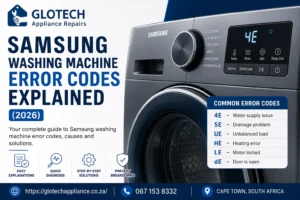
• Error codes such as 5E, SE, or OE
These are clear indicators of a drainage issue.
Safety First Before Troubleshooting
Before inspecting your washing machine:
• Turn off the power supply
• Close the water inlet tap
• Avoid contact with standing water near electrical components
Safety should always come first.
Step-by-Step Troubleshooting Guide
Step 1: Clean the Drain Filter
The drain filter is the most common cause of drainage problems.
Over time, debris such as lint, coins, hair, and small objects collect in the filter, restricting water flow.
What to do:
- Locate the filter panel (usually at the bottom front)
- Open the panel carefully
- Unscrew the filter slowly to release water
- Clean the filter thoroughly
- Reinstall it securely
This simple step resolves a large percentage of drainage issues.
Step 2: Check the Drain Hose
The drain hose carries wastewater out of the machine.
Check for:
• Kinks or bends
• Blockages inside the hose
• Incorrect positioning
If the hose is blocked or restricted, water cannot exit properly.
Step 3: Inspect the Household Drain System
Sometimes the issue is external.
If your sink or drain pipe is blocked:
• Water backs up into the washing machine
• The machine appears faulty
This type of issue overlaps with general drainage problems seen in washing machines not draining, where flow restriction causes backup.
Step 4: Listen to the Drain Pump
During the drain cycle, the pump should make a soft humming sound.
If you notice:
• No sound → pump may not be working
• Loud grinding → obstruction or damage
This may indicate a pump-related fault.
Step 5: Check for Unbalanced Loads
An unbalanced load can prevent proper draining and spinning.
Signs include:
• Excessive vibration
• Cycle stopping prematurely
Redistribute the load and try again.
Step 6: Check for Samsung Error Codes
Samsung machines display error codes to indicate faults.
Common codes include:
• 5E / SE – Drainage issue
• OE – Overflow problem
• ND – Not draining
These codes help confirm the nature of the problem.
Common Causes of Samsung Drainage Problems
1. Blocked Filter or Pump
Most common and easily fixable issue.
2. Faulty Drain Pump
The pump may fail due to wear or blockage.
3. Hose Blockage or Damage
Restricts water flow.
4. Electrical or Control Faults
Prevent the drain cycle from activating.
5. Installation Errors
Incorrect hose height or positioning can affect drainage.
Repair Cost Insight (Non-Overlapping)
Repair costs vary depending on the issue.
Typical scenarios include:
• Filter cleaning – low cost
• Pump replacement – moderate cost
• Electrical repair – higher cost
For a detailed breakdown, see:
washing machine repair cost guide
When to Call a Professional Technician
Troubleshooting is useful, but some problems require expert attention.
Call a technician if:
• The machine still does not drain after cleaning
• Error codes persist
• The pump is noisy or silent
• Water leakage occurs
• The machine stops mid-cycle
Booking washing machine repair services near you ensures safe and accurate repair.
Preventing Future Drainage Issues
Preventative maintenance reduces the risk of recurring problems.
• Clean the filter regularly
• Check pockets before washing
• Avoid overloading
• Use the correct detergent
• Inspect hoses periodically
Frequently Asked Questions
Why is my Samsung washing machine not draining?
This is usually caused by a blocked filter, clogged hose, or faulty drain pump.
What does the 5E error mean?
It indicates a drainage issue, often related to blockages or pump failure.
Can I fix a drainage problem myself?
Basic checks like cleaning the filter can solve minor issues, but mechanical faults require professional repair.
How much does it cost to fix a Samsung washer?
Costs vary depending on the issue. Minor repairs are affordable, while pump or electrical repairs cost more.
Is it safe to use a washing machine that is not draining?
No, continued use can cause damage and increase repair costs.
When should I call a technician?
If troubleshooting does not resolve the issue or error codes persist.
Final Thoughts
A Samsung washing machine not draining is a common issue, but it is often caused by simple, fixable problems. By following basic troubleshooting steps, you can identify the cause early and avoid unnecessary expenses.
However, when the issue persists, professional diagnosis ensures the correct fault is repaired safely and efficiently. Acting early not only restores your machine’s performance but also prevents further damage.